
S3010A Radial Insertion Machine: Training, Troubleshooting & Restart Protocols for PCB Lines
A hands-on restart and troubleshooting protocol for the S3010A radial inserter — verify safety, recalibrate setpoints, check sensors, then ramp with AOI verification.
Aug 12, 2026 · Updated Aug 31, 2026 · Jason Wu
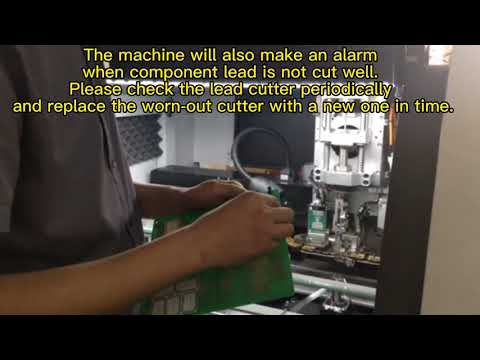
S3010A Radial Insertion Machine: Training, Troubleshooting & Restart Protocols for PCB Lines
When an S3010A stops for a tooling change, a shift handover, or a jam, the expensive mistake is restarting it on autopilot. A wrong clinch-force setting or an uncalibrated feeder can insert a whole batch of boards with bent leads before anyone notices. This guide lays out the restart and troubleshooting protocol our technicians use so a line lead can bring the S3010A back to rate safely and repeatably.
The cost you haven't named: unstructured restarts
Most downtime is planned; the damage happens in the minutes after the machine comes back up.
- Wrong setpoints after changeover. A new PCB thickness silently breaks the old clinch-force and lead-cut settings.
- Uncalibrated sensors. Marginal lead spans slip past detection and get mis-inserted at rate.
- Skipped safety checks. Rushing past E-stop and air-pressure checks risks operator and machine damage.
- No ramped restart. Jumping straight to full speed hides a bad setup until a batch is scrap.
The Four-Step S3010A Restart & Troubleshooting Protocol
Treat every restart as a repeatable protocol, not a guess. Call it the Four-Step S3010A Restart & Troubleshooting Protocol.
1. Verify the safety and power state. Confirm the E-stop is released, air pressure is in range, and main power is stable before the machine moves. This step removes the most common cause of restart injuries and crashes.
2. Recalibrate the insertion setpoints. Check lead cut length, clinch force, and feeder indexing against the current PCB thickness and hole tolerance. The goal is to match the board in the machine now, not the one that ran yesterday.
3. Run the component-detection check. Test the component detection sensors on your marginal lead spans so mis-insertion is caught before rate. This is the step most often skipped and most often responsible for scrap.
4. Execute a controlled restart. Run a single slow board, confirm insertion and clinch, then ramp to full rate with AOI verification. Only after AOI passes do you release the station to production volume.
The vehicle: S3010A Radial Insertion Machine
The protocol above maps onto the S3010A's built-in safeguards and adjustment points.
- Verify the safety and power state → interlocked start. The S3010A's E-stop, air-pressure, and power monitoring gate any motion, so the first protocol step is enforced by the machine before a restart can begin.
- Recalibrate the insertion setpoints → programmable clinch and cut. Lead cut length and clinch force are set per board, and feeder indexing is configured per component, letting a line lead match the current PCB thickness and hole tolerance precisely.
- Run the component-detection check → adjustable sensors. Component detection sensors are calibrated to catch marginal lead spans, so the machine rejects or flags a part before it is inserted at rate.
- Execute a controlled restart → single-board ramp. A slow single-board pass followed by AOI verification lets the station prove its setup before full-rate production, containing any bad setting to one board.
Specification note: exact clinch-force, cut-length, and feeder-indexing ranges should be confirmed at quotation and recorded in your standard work, because they depend on your component mix and board stack-up rather than a fixed default.
The loop: re-train and re-audit every quarter
Skills fade and boards change, so a protocol learned once does not stay reliable. Build a loop: every quarter, re-run the Four-Step S3010A Restart & Troubleshooting Protocol as a hands-on drill with new line leads, compare restart defect logs against the previous quarter, and update the standard work when a product family changes. Treat the protocol as a living procedure, not a poster on the wall — the loop is what keeps restarts safe and scrap low instead of depending on whoever happens to be on shift.
Your next step
Send us your S3010A model, the PCBs you run, and your current restart checklist. We will return a training and troubleshooting review outlining the setpoints to document, what to confirm at quotation, and how to standardise the restart across shifts. Reach Jason at jasonwu@smthelp.com or on WhatsApp +86 13602562576.
FAQ
When should we run the restart protocol?
After any tooling change, shift handover, jam recovery, or PCB changeover — essentially every time the machine stops and restarts.
Why calibrate sensors on marginal lead spans?
Marginal spans are the ones most likely to escape detection and get mis-inserted at rate, so they are the highest-risk step to skip.
What is the controlled restart sequence?
Run one slow board, confirm insertion and clinch, pass AOI, then ramp to full rate — never jump straight to production speed.
How does clinch force relate to PCB thickness?
Clinch force and lead cut length must match the board thickness and hole tolerance, or leads sit loose or get damaged.
Are the adjustment ranges standard?
Clinch, cut, and indexing ranges depend on your components and board stack-up, so exact values are confirmed at quotation and logged in standard work.
Specifications
| Parameter | Value |
| --- | --- |
| Machine | S3010A Radial Insertion Machine |
| Restart sequence | Safety → setpoints → sensors → ramp |
| Lead cut length | Matched to PCB thickness and hole tolerance |
| Clinch force | Calibrated per board |
| Feeder indexing | Configured per component |
| Detection | Component sensors for marginal spans |
| Verification | Single-board pass + AOI |
| Ramp-up | Full rate after AOI pass |
Jason Wu
Founder & CEO, Southern Machinery (Shenzhen Southern Machinery Sales and Service Co., Ltd.)
Email: jasonwu@smthelp.com / info@smthelp.com
WhatsApp: +86 13602562576
Catalog & manuals: file.autoinsertion.com | Machine photos: ph.smthelp.com
LinkedIn: linkedin.com/in/smtsupplier | YouTube: youtube.com/c/Smthelping
Comments
Comments appear after approval.