
SBS-01 SMT Reel Barcode Scanner: Trace Every Component from Receiving to Placement
A dedicated scanning station for SMD reels that captures lot, date code and MSL data at receiving and feeds verified records into WMS, MES or ERP.
Aug 8, 2026 · Updated Aug 31, 2026 · Jason Wu
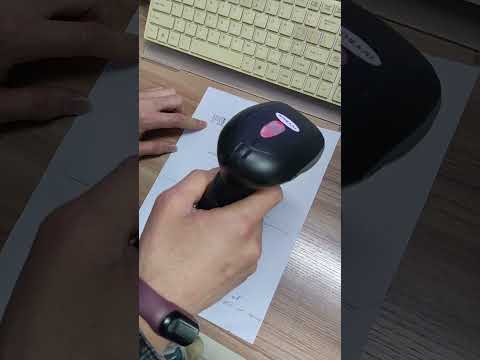
SBS-01 SMT Reel Barcode Scanner: Trace Every Component from Receiving to Placement
Pick any reel off your kitting shelf and ask two questions: who received it, and how much floor life does it have left. In most factories the answer takes a phone call, a paper ledger and a guess. That gap is not a documentation problem — it is where wrong-component builds, expired MSD placements and slow audit responses all begin. The SBS-01 closes it at the cheapest possible point: the moment the reel arrives on your dock.
The cost you haven't named: unverified receiving
Receiving is treated as an administrative task, so it gets the least automation and produces the most expensive errors.
- Reels are awkward to scan. They are round, labels curve, and bulk shipments arrive with overlapping barcodes. A hand-held gun on a cluttered bench produces failed reads and operator fatigue.
- A generic scanner has no logic. It reads a code. It does not validate MSL ratings, flag shelf life, match alternate part numbers or generate an internal label.
- Manual entry mislabels inventory. In high-mix work, logging a reel against the wrong customer BOM is routine, and it surfaces at the feeder bank hours later.
- Audits get reconstructed, not retrieved. Without a digital scan log, traceability reports are rebuilt from paper across a full shift instead of generated in seconds.
The Four-Gate Component Traceability Audit
Before specifying a scanning station, audit your chain of custody as four gates. Call it the Four-Gate Component Traceability Audit.
1. Inventory the symbologies you actually receive. Collect labels from your real suppliers and record which 1D formats (Code 128, Code 39) and 2D formats (Data Matrix, QR) appear, plus how many arrive damaged or partly obscured. First-pass read rate on curved reel labels is the metric that matters, not catalogue read speed.
2. Define your MSD rules in writing. State how floor life is tracked, what happens when a reel nears expiry, and how remaining exposure is calculated after bake-out. If those rules are not written down, no scanner can enforce them.
3. Name the system of record. Decide whether captured data lands in WMS, MES or ERP, and by what route — CSV export, REST, MQTT or a direct database write. Confirm the connector before the hardware.
4. Set the second-verification point. Decide where a reel is scanned again before it is consumed: at kitting, at feeder loading, or both. One scan at receiving fixes inventory accuracy; two scans are what prevent wrong-component-on-feeder events.
The vehicle: SBS-01 SMT reel barcode scanner
The SBS-01 is a dedicated scanning station for SMT component reel data capture, positioned at the material receiving checkpoint. Each audit gate maps onto a capability.
- Inventory the symbologies → a purpose-built scanning window. An optimised window, proper lighting and ergonomic positioning are what raise first-pass reads on round reels and curved labels compared with a hand-held gun over a shift of repetitive scanning.
- Define your MSD rules → validation built into the workflow. At incoming inspection the station records part number, lot code, date code, quantity and Moisture Sensitivity Level, and can flag expired or near-expiry MSD reels for priority use or bake-out.
- Name the system of record → direct data capture. Verified records feed the factory's WMS, MES or ERP, so real-time inventory counts update from the scan instead of from a later keyboard session.
- Set the second-verification point → downstream triggers. After a successful scan the station can print an internal label in your own part-number format, reserve the reel for a specific work order, or queue it into an intelligent storage rack such as the SIS7000A, where LED-guided picking cuts retrieval from minutes to seconds.
The resulting chain of custody is simple: receive and validate against purchase order data, store with the scan record attached, reserve and locate for the work order, scan again at feeder loading, then link every scan event to the finished board serial. If a field failure is traced to a lot, you identify every board that received it in minutes instead of days.
Specification note: read rates, connector format, label templates and enclosure details are confirmed at quotation, because they depend on your supplier labels, ERP or MES environment and bench layout.
Specifications
| Parameter | Value |
|---|---|
| Station type | Dedicated SMT reel barcode scanning and data-capture station |
| Symbologies | 1D (Code 128, Code 39) and 2D (Data Matrix, QR) |
| Captured fields | Part number, lot code, date code, quantity, MSL rating |
| MSD handling | Floor-life tracking with near-expiry and expiry flags |
| System integration | WMS / MES / ERP via CSV export, REST or database write |
| Label output | Internal barcode label printing in factory part-number format |
| Operator throughput | Approx. 60–120 reels/hour, versus 20–40 with manual entry |
| ESD provision | ESD-safe housing and work surface; ratings confirmed at review |
| Fallback entry | Manual part/lot entry with new internal label generation |
Where it earns its bench: automotive Tier-1 suppliers under IATF 16949 traceability requirements on ECU, BMS and ADAS modules; medical electronics under ISO 13485, needing documented proof of approved, unexpired components per build; high-mix EMS floors juggling hundreds of part numbers; and LED and consumer production, where one wrong resistor value can scrap a batch.
The loop: re-run the gates each quarter
Traceability decays quietly as suppliers, labels and part numbers change. Build a loop: each quarter, re-sample incoming labels and re-measure first-pass read rate, re-check MSD flag accuracy against your written rules, and reconcile system inventory against a physical count on sampled part numbers. Compare wrong-component incidents and audit response time with the previous quarter. When a new customer BOM or supplier is onboarded, re-run the four gates before the first build. The loop keeps the scan log trustworthy — and an untrusted log is worse than none, because people quietly stop using it.
Your next step
Send us your receiving volume, the ERP or MES you need to feed, and a sample of the supplier labels you actually receive. We will return a receiving-workflow review showing where the SBS-01 fits, what integration route to specify, and which figures to confirm at quotation. Reach Jason at jasonwu@smthelp.com or on WhatsApp +86 13602562576.
FAQ
Can the SBS-01 work with our existing ERP system?
Scanning stations built for SMT environments typically support CSV export, REST API integration or direct database writes. Confirm your specific connector requirements during evaluation.
Does this replace the need for a full MES?
No. It is a data-input device that feeds clean, verified records into your MES or WMS. Many factories deploy the scanner first to fix receiving errors, then layer full MES traceability on later.
How does it handle reels without barcodes?
The operator enters part number and lot data through the station interface, and the SBS-01 generates a new internal label in the factory's own barcode format.
Why not just use a hand-held gun?
Reels are round with curved labels, and bulk shipments arrive with overlapping codes. A fixed station with an optimised window and lighting raises first-pass reads, and it carries the business logic a generic gun lacks: MSL validation, shelf-life alerts, alternate part matching, label generation.
Can one station serve a multi-line factory?
Yes. A single station at central receiving can serve several SMT lines. For distributed docks, multiple stations can be networked to a shared inventory database.
Jason Wu
Founder & CEO, Southern Machinery (Shenzhen Southern Machinery Sales and Service Co., Ltd.)
Email: jasonwu@smthelp.com / info@smthelp.com
WhatsApp: +86 13602562576
Catalog & manuals: file.autoinsertion.com | Machine photos: ph.smthelp.com
LinkedIn: linkedin.com/in/smtsupplier | YouTube: youtube.com/c/Smthelping
Comments
Comments appear after approval.