
Smart SMT Stencil Storage System: Controlled Retrieval and Tracking
A controlled storage and retrieval cabinet for SMT stencils with LED guidance, QR scanning, usage tracking and audit-ready records for multi-line EMS floors.
Jul 23, 2026 · Updated Aug 31, 2026 · Jason Wu
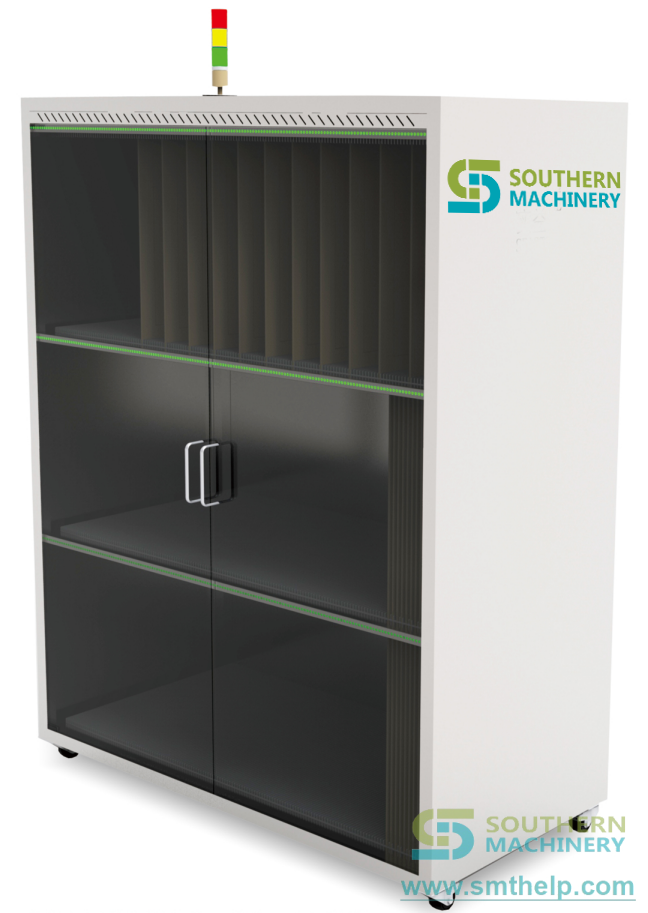
Smart SMT Stencil Storage System: Controlled Retrieval and Tracking
On a high-mix SMT floor, a printer changeover stalls for the minutes an operator spends hunting the right stencil among a wall of frames. In one internal line study, mis-located or unverified stencils contributed to a measurable share of first-article print defects, and the time lost to manual searching never appears on any OEE report. Most factories track stencil cost closely but manage stencil location loosely — until a wrong-frame print forces a strip-down and a re-paste.
The cost you haven't named
High-mix EMS, ODM, automotive, medical and industrial-control lines carry dozens or hundreds of stencils, yet most factories manage them with a wall of frames and a person's memory. The cost shows up as lost minutes that never reach a report.
- Search time at changeover. An operator walks the rack, reads labels by hand and sometimes pulls the wrong frame, adding minutes to every printer changeover across multiple SMT lines.
- Wrong-stencil print risk. Without a verified pick, the line can run a stencil that does not match the current product, forcing a strip-down, re-paste and a first-article redo.
- No lifecycle visibility. Usage counts, last-used dates and maintenance history live in someone's head, so stencil wear and reorder timing are guesses.
- Audit gaps. When a traceability review asks which stencil ran which lot, manual records are slow to reconstruct and easy to get wrong.
The Stencil Control Audit
Before buying storage, frame the problem as a repeatable audit rather than a cabinet purchase. Call it the Stencil Control Audit.
1. Count the stencils and lines. List every stencil, its product family and which SMT line it serves. The total tells you the slot count and the retrieval load you actually carry.
2. Map the changeover path. Record how an operator finds, verifies and returns a stencil today, including the walk, the check and the record. Every manual step is a place the system can remove.
3. Define identification and order. Decide how each stencil is tagged (QR slot ID) and whether FIFO or LIFO fits each product family's shelf-life and revision needs.
4. Set the audit-ready target. Define success as: correct stencil every time, usage logged automatically, and records exportable on demand. That becomes your acceptance test at delivery.
The vehicle: Smart SMT Stencil Storage System
The framework maps onto how the Smart SMT Stencil Storage System is deployed on a multi-line floor.
- Count the stencils and lines → slot-level storage. The cabinet stores stencils in individually identified slots, so the system always knows what is present and where, across the full stencil population of your lines.
- Map the changeover path → LED guidance and PDA scan. Smart LED indicators point the operator to the exact slot, while PDA and QR-code scanning confirm the right stencil before it leaves the cabinet, removing the manual label read.
- Define identification and order → FIFO/LIFO logic. The system applies FIFO or LIFO per product family, so revision and shelf-life rules are enforced by software instead of by memory.
- Set the audit-ready target → usage tracking and records. Each retrieval and return updates a per-stencil usage count and last-used record, producing audit-ready logs you can export when a review arrives.
Specification note: cabinet layout, slot capacity, stencil-size limits and MES/ERP integration should be confirmed at quotation, because they depend on your stencil dimensions, number of lines and software environment rather than a single default.
| Parameter | Value |
| --- | --- |
| System type | Automated stencil storage and retrieval cabinet |
| Storage capacity | 30–120 stencil slots (cabinet dependent) |
| Identification | QR-code slot ID + PDA scanning per stencil |
| Guidance | LED position indicator at target slot |
| Retrieval logic | FIFO / LIFO selectable per product family |
| Usage tracking | Per-stencil cycle count and last-used record |
| Records | Audit-ready access and usage log export |
| Integration | MES / ERP linkage confirmed at quotation |
The loop: re-audit every quarter
Stencil needs change as products and lines change. Build a loop: every quarter, repeat the Stencil Control Audit, compare the current slot count and retrieval load against the previous quarter, and review usage logs with your production leads. If a new product family adds stencils or a line is added, re-map before it ramps. Treat the audit as a living document — the loop is what keeps the cabinet earning its place instead of becoming an expensive rack that stores frames but never answers a question.
Your next step
Send us your stencil count, the stencil sizes you run, how many SMT lines pull from the cabinet, and your MES/ERP environment. We will return a Stencil Control Audit showing slot capacity, FIFO/LIFO setup and what to confirm at quotation. Reach Jason at jasonwu@smthelp.com or on WhatsApp +86 13602562576.
FAQ
Does the system replace the stencil printer?
No. It supports the storage, retrieval and material-management workflow around the printer; it does not perform solder printing itself.
How does it prevent wrong-stencil use?
LED guidance points to the exact slot and PDA/QR scanning confirms the stencil identity before removal, so the operator verifies the pick instead of guessing from a label.
What about FIFO and LIFO?
The system applies FIFO or LIFO per product family, letting you enforce revision and shelf-life rules by configuration rather than by operator memory.
Can it feed our audit and traceability needs?
Each retrieval and return writes a per-stencil usage and last-used record, producing exportable, audit-ready logs for traceability reviews.
Does it connect to our MES?
MES/ERP linkage is supported and should be confirmed at quotation against your specific software and line setup.
Jason Wu
Founder & CEO, Southern Machinery (Shenzhen Southern Machinery Sales And Service Co., Ltd.)
Email: jasonwu@smthelp.com / info@smthelp.com
WhatsApp: +86 13602562576
Catalog & manuals: file.autoinsertion.com | Machine photos: ph.smthelp.com
LinkedIn: linkedin.com/in/smtsupplier | YouTube: youtube.com/c/Smthelping
Comments
Comments appear after approval.